How to Digitize Your Family Recipes and Cookbook
Turn grandma's printed or handwritten recipes into searchable recipes on your phone: how to photograph the pages, fix old measures and keep the originals.
By the Matlaro teamPublished 7 min read
To digitize a family cookbook, photograph each recipe flat and in good light, turn the photo into text, then fix the old measures while someone who knows the dish can still answer questions. One recipe per photo, one session per evening, and the favourites first. A shoebox of cards becomes a searchable cookbook in a few weeks of short sittings.
This guide covers the whole job: how to photograph pages so they read well, what to do with "a cup of flour" and "a knob of butter", how to keep the originals, and how Matlaro turns a photographed page into ingredients and steps.
Start with a list, not the camera
The mistake is starting at page one. A family cookbook has 200 recipes and the family cooks twelve of them. Do those first.
- 1
Ask what people actually cook
Text the family: "Which three of Grandma's recipes do you want?" The overlap is your first batch.
- 2
Pull those pages and cards
Put a sticky note on each, or lay the cards out on the table.
- 3
Note who to ask
For each recipe, write the name of the person who still makes it. They are your source for everything the card leaves out.
How to photograph a recipe page so it reads well
Text recognition is good, but it reads what the camera gives it. A few habits make the difference between a clean result and a page of guesses.
- The page lies flat. Press a book open with a glass plate or a ruler at the edges, not your fingers
- Daylight from a window, no flash. Flash leaves a white spot exactly where the text is
- The page fills the frame, camera held straight above it, not at an angle
- One recipe per photo. If a page has two, photograph it twice and crop
- Stained or faded cards: shoot them on a dark surface so the edges stand out
Handwriting is the hard case. Neat handwriting often reads well. Loopy cursive, faded pencil and notes squeezed into the margin may not. For those, the fastest route is to type the recipe in while reading the card, and keep the photo for the memory.
Fix the old measures while you can
Family recipes are written for someone who already knows how to make them. "A cup" was a specific cup in a specific kitchen. Turn those into amounts someone else can follow.
| On the card | What to do |
|---|---|
| A cup of flour | Ask which cup. Fill it, weigh it, write grams next to it |
| A knob of butter | Usually a small piece. Ask the cook, or start with 15 to 20 g and note it |
| Bake until done | Ask for a time and a sign: "25 min, top golden, skewer clean" |
| Season to taste | Fine to keep, but note what she actually reached for |
| A tin of tomatoes | Write the size. Tins differ between countries |
Keep the originals, too
A digitized recipe is for cooking. The card is for the family. Keep both.
- Save the photos in their own album so they are not lost among everything else on your phone.
- Write down the stories while you hear them: who made it, for which occasion, what she changed. A notes field on the recipe is a good home for that.
- Put the physical cards somewhere dry and out of the kitchen, away from steam and splashes.
Photographing a page into Matlaro
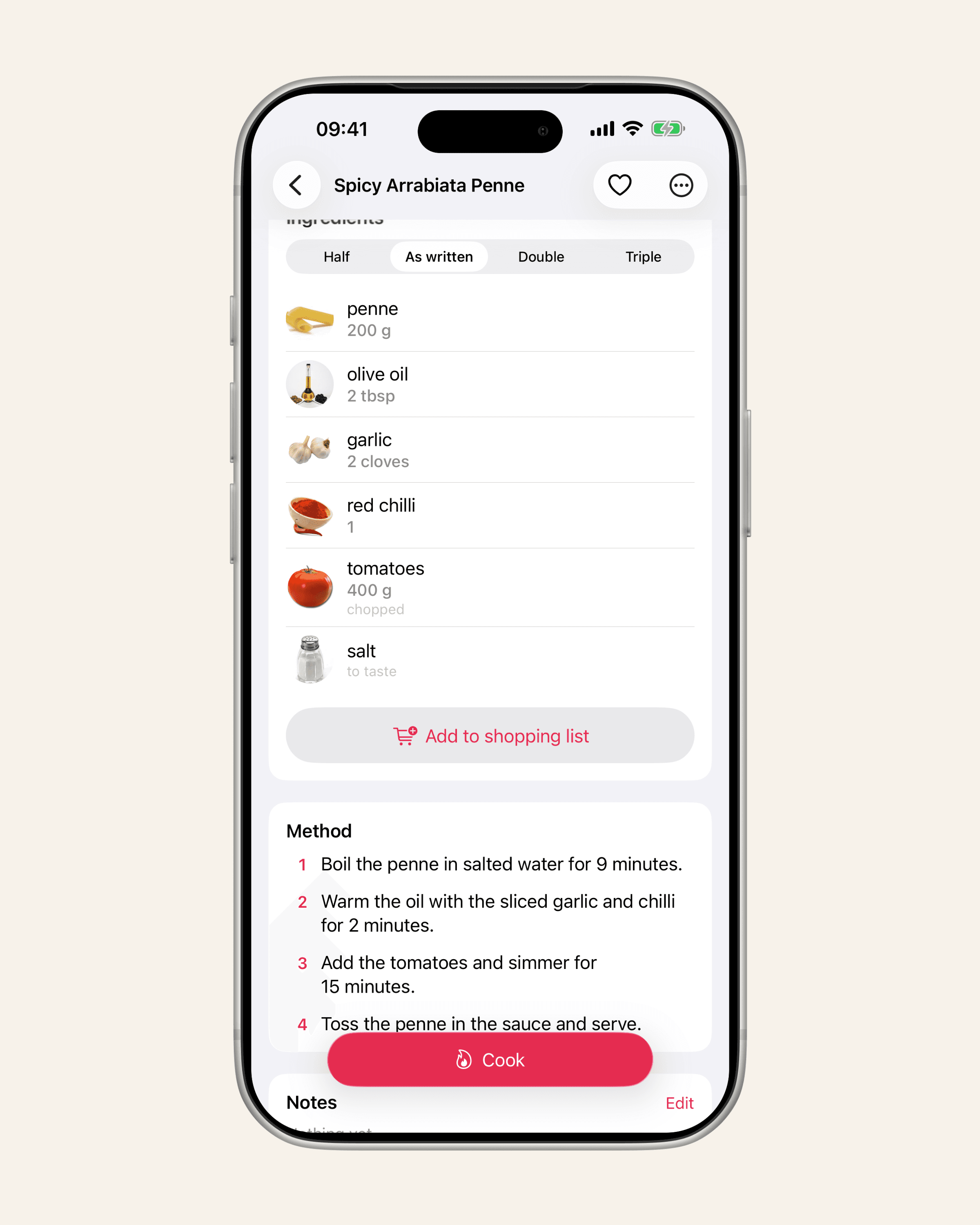
In Matlaro, a photographed page becomes a recipe with its ingredients and method in order, ready for cook mode. This is part of Matlaro Unlimited, the subscription. On the free plan you can still add every family recipe by typing it in, which is free and never counts against anything.
- 1
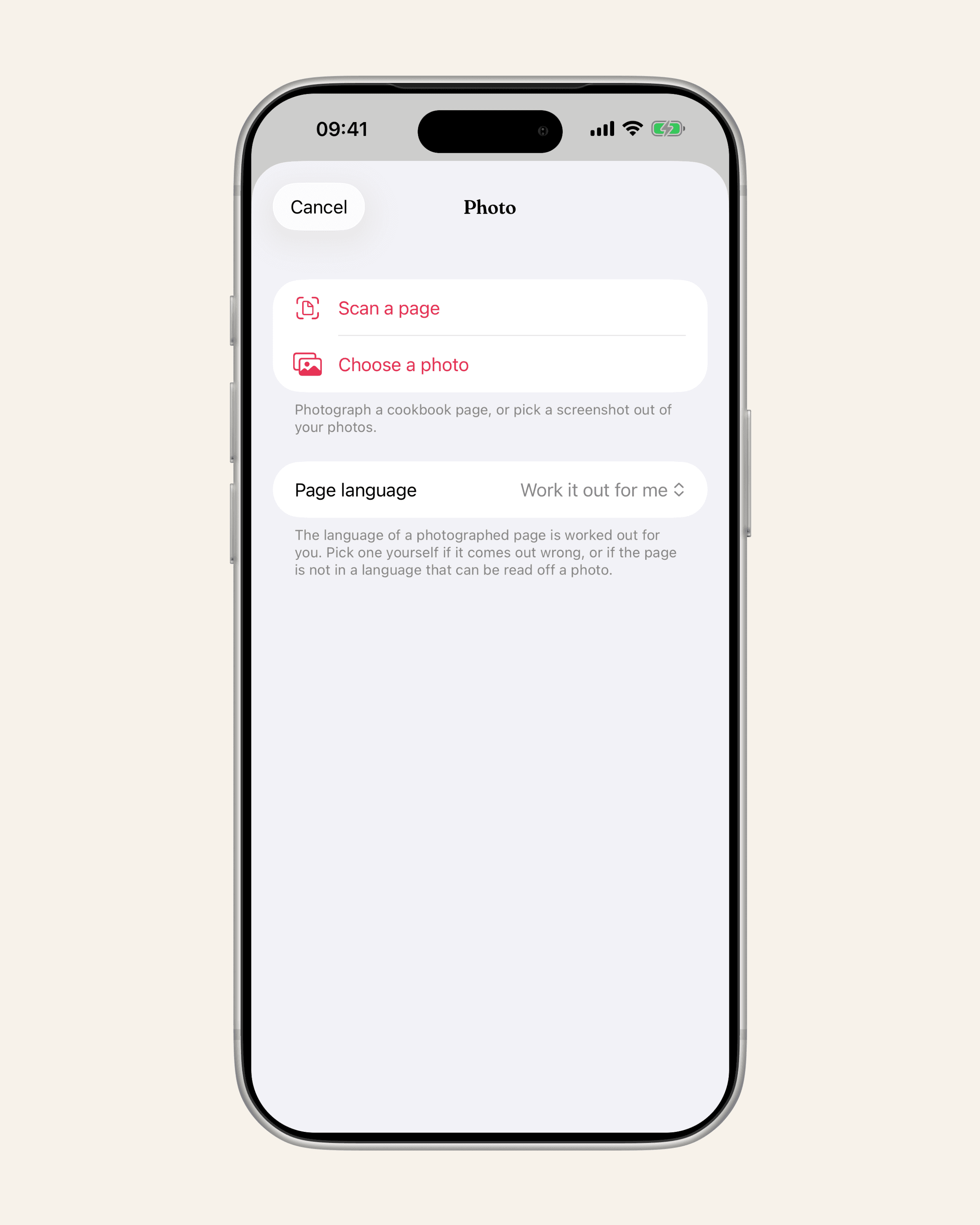
Open Add a recipe and choose Scan a page
Hold the phone over the page. The scanner finds the page edges for you.
- 2
Check the language
The language of the page is worked out for you, across 14 languages for photos. If it comes out wrong, pick it yourself.
- 3
Look it over and save
The text read from the page is sorted into ingredients and steps. Fix any word the photo got wrong, then save.
What happens to the photo: the text is read on your phone. That text passes through Matlaro's server once to be put in order and is not kept there. The recipe is stored on your phone, and it works without a connection.
A few details that help with old books:
- One page, one recipe. If you scan several pages at once, Matlaro makes the recipe from one and tells you how many pages are left, so you can scan the next on its own.
- It will not guess. If the photo has no clear ingredients and method, you get the text that was read and a message, not an invented recipe.
- Typing is never metered. Ingredients go one per line, and amounts are read as you type them, with ingredient suggestions as you go. If you have no photo of the dish, a picture is found for you.
Make it a family cookbook again
Once the recipes are on your phone, they are useful in ways the shoebox never was. Search across everything for "rhubarb". Put Grandma's recipes in their own cookbook. Cook the Christmas biscuits for 30 instead of 12 and let the amounts follow; scaling a recipe has the details on what to watch, like eggs and baking times.
If the family recipes are only part of your collection, five ways to organise your recipes compares binders, notes and apps side by side.
The best time to write down how a dish is made is while the person who makes it is still standing next to you.
Frequently asked questions
What is the best way to scan old recipe cards?
Lay each card flat in daylight, hold the phone straight above it so the card fills the frame, and take one photo per recipe. Skip the flash.
Can a phone read handwritten recipes?
Neat handwriting often reads well. Faded pencil or tight cursive may not, and typing those in while reading the card is usually faster than correcting.
Is photographing a cookbook page free in Matlaro?
Photo pages are part of Matlaro Unlimited. Typing a recipe in by hand is free on every plan and never counts as an import.
Do my family recipes leave my phone?
The recipes are stored on your phone. When a page is read, its text passes through Matlaro's server once to be put in order and is not kept.